

Engage As Your Business Page
Are you getting frustrated with the time you spend on Facebook making that perfect post? You even added pictures, only to have just a couple of likes and not much else. How does that make you feel? I know I get frustrated and want to throw in the ol’ Social Media towel – but you can’t! What else have you been doing on Facebook as your business? Have you liked any other pages as your BUSINESS PAGE? Have you liked any other posts as your BUSINESS PAGE? Have you shared any other business on your BUSINESS PAGE? What?!? You don’t know how? Well, let me show you a couple of extra steps that may help grow your Facebook following for your Business Page.
42% of marketers report that Facebook is critical or important to their business.
How to “Like” another Page as YOUR Page
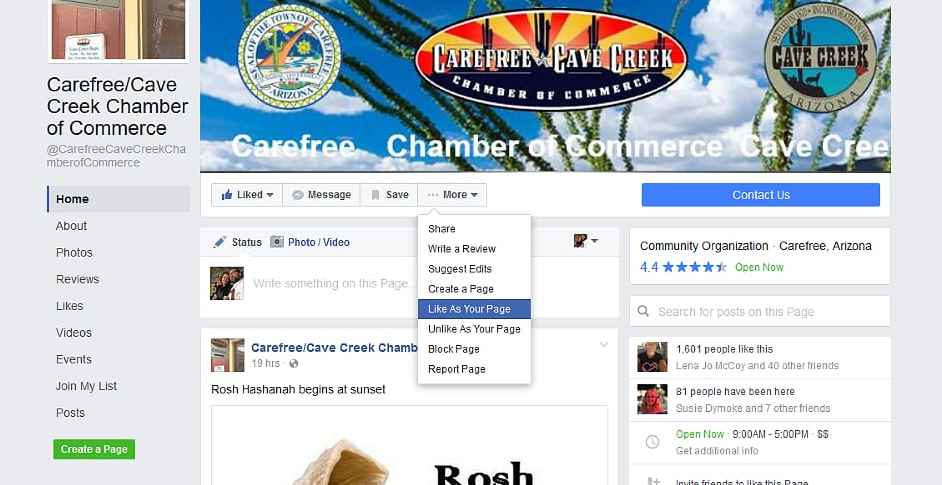
Go to the Page you want to “like”. Hover over the . . . More button and scroll down to “Like as Your Page” – Click. – You now have “Liked” the page of another business as your Business.
Hopefully, this business will see this and in turn “Like” your page. Make sure you are also returning the favor!
How to “Like” or Comment as YOUR Business Page
This can only be done on another Business Page
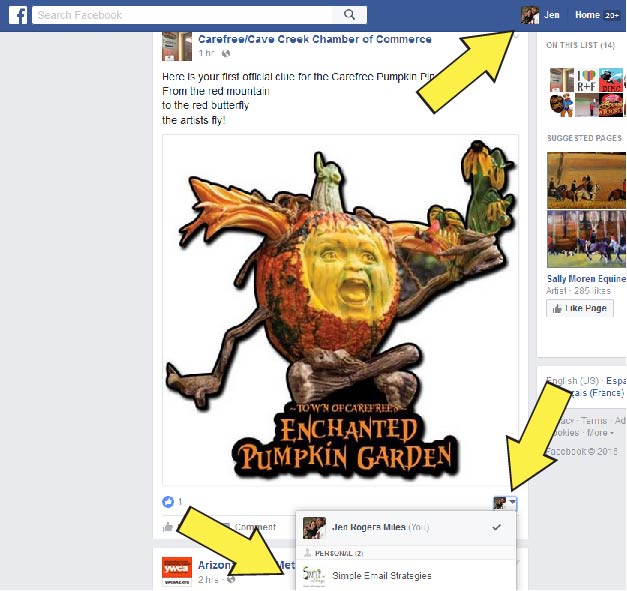

When you see a post from a Business Page that you want to “Like” or comment on as your business page here is what you need to do:
- Locate the triangle on the bottom, right side of the post that you want to “Like”. It should have your personal page profile picture showing right now.
- Click on that triangle and you should see your Business Page profile picture.
- Click on your page.
Now you should see your Business Page’s profile picture. If you do – “Like” away!! You can also comment as your business. Whenever you see your personal profile picture you will be posting/liking/commenting as you – If you see your Business Page’s profile picture, you will be posting/liking/commenting as your Business Page.
You can switch back and forth between your personal profile and your business page. As you Like/Comment as your self, also Like/Comment as your page!
This only works for other Business Pages. Unfortunately, you can not Like/Comment on other individual’s profile pages.
The examples are shown from a desk top. There are ways that you can Like/Comment from you mobile devices however, it seems to be hit or miss. A lot of extra steps, but I would be happy to work with you to see if the process works better on your mobile device.
Feel free to call, text or Email me if you still have questions. Need a few more hints and tips? Sign up to receive my monthly newsletter.
You can even practice on my page!